Rhino Next is a live crash course for architects. Learn in 3 evenings what most people take months to figure out — and watch a real parametric airport facade go from a pencil line to a fabrication-ready model.
₹9,999 launch offer (reg. ₹30,000) · 4 free bonuses · limited seats.
Endless tutorials, trial and error, and still freezing when it's your own form on the screen — that's the long road most people take. This workshop is the shortcut: the right sequence, taught live, that compresses months of guesswork into three focused evenings.
The reason most people take months isn't that Rhino is impossible — it's that they learn tools in a random order, with no map. This workshop follows the exact path that turns confusion into confidence, in the order that actually makes it stick. That's how three evenings can do the work of months.
Not a "watch and forget" course. You leave able to design in Rhino — and with a skill worth putting on your CV.
Translate the form in your head into accurate Rhino geometry, without fighting the tools.
Look at any form and see the curve network and surface moves that build it.
See how a parametric facade is organized, panelized and taken toward fabrication.
Add Rhino to your CV and actually back it up — with the ability to design, not just click buttons.
Each session is three focused hours with 30 minutes of hands-on practice built in — so you don't just watch, you build, every single night.
Why Rhino for architects; interface tour — viewports, command line, Osnaps, Gumball, layers.
Coordinate input, snaps, CPlanes; lines, polylines, arcs, control-point & interpolate curves; editing — control points, rebuild, match, blend.
Extrude, revolve, basic solids; Boolean operations and their pitfalls.
How to "read" a sketch — profiles, sections, rails; decomposing a form into curve networks.
Translate a simple massing sketch into curves + extrusion.
Loft, Sweep 1 & 2, Network Surface, Revolve, Rail Revolve — when to use which; planar surface, patch, edge surface.
Control point editing, rebuild, degree/span basics; curvature & continuity (G0/G1/G2); trim, split, join, cap.
Live demo breaking a complex form into a surface strategy; 2–3 ways to build the same form.
Build a curved / double-curved form from your own sketch.
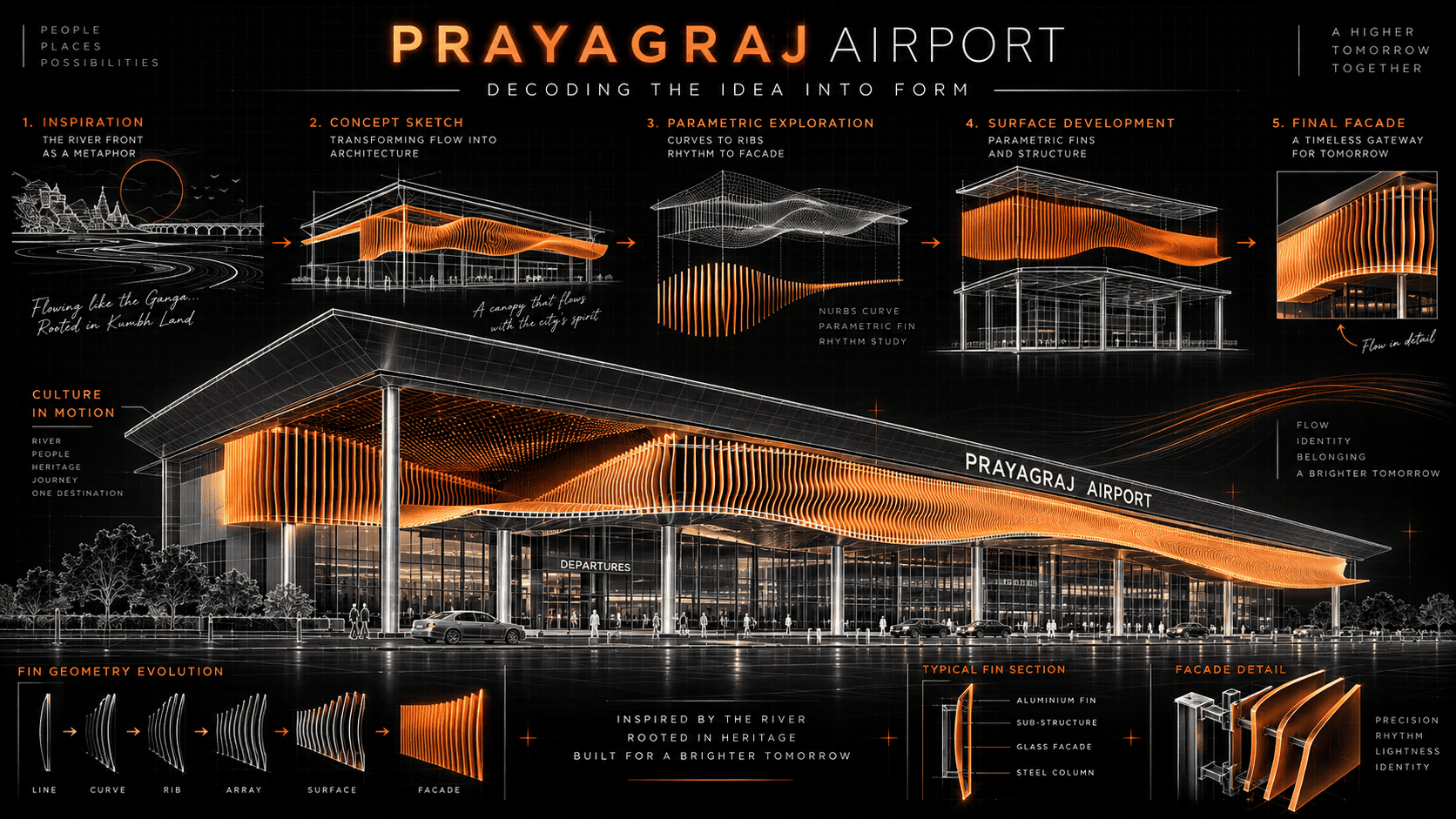
Design intent & sketch origin; decoding the form into buildable geometry; panelization / repetition logic; challenges & constraints; how the model served fabrication & documentation.
Model organization — layers, naming, blocks; section, Make2D, export; a teaser on Grasshopper / parametric.
Replicate a simplified panelized facade module, step by step.
Finish, share screens, feedback, next steps, confidence check.
On the final evening, you'll walk through the Prayagraj Airport Terminal parametric facade — a real project — from the original design sketch all the way to a fabrication-ready model. This is the part no tutorial gives you: how a complex form is actually reasoned about and built.
The Prayagraj Airport Terminal facade you'll decode on Day 3 isn't a case study pulled from the internet — it's real project work. Puneet brings international project experience directly into the room, so you learn how forms are reasoned about in practice, not just in theory.
Live, hands-on, seats limited — book at the special launch price before it closes.
Beginner-friendly · starts from the basics · architects & students welcome.
Three evenings from now, you could be turning your own sketches into confident 3D form — instead of still watching tutorials. Seats are limited — book yours.
Book Your Seat →